

From October 2nd 2025 the Universal Care Plan (UCP) has enhanced its functionality and security. The two key improvements include an integration with GP Connect: Access Structured Record and the introduction of multi-factor authentication for web portal HSCN access.
Please see below for further details on these updates:
GP Connect: Access – Structured Record
GP Connect is a national NHS service that helps different parts of the healthcare system share patient information safely and quickly. The UCP integration with GP Connect: Access – Structured Record allows users to view a patient’s allergies and medications within the UCP, so they have up-to-date information about these patient records. GP Connect: Access – Structured Record in the UCP helps all professionals involved in the patient’s care access the same information, helping avoid mistakes and improve decisions.
For more information about GP Connect, click here
Frequently Asked Questions about GP Connect
Why has the UCP integrated with GP Connect: Access – Structured Record?
The UCP has integrated with GP Connect: Access – Structured Record to enable fast and secure access to a patient’s allergies and medication information across the healthcare system. This data sits alongside the patient’s care plan, improving the quality and coordination of care.
This integration reduces the need for patients to repeat their medical history and minimises the administrative burden of manually entering medication and allergy details into the UCP. It also helps prevent duplication and reduce the risk of data discrepancies.
How do allergies and medications show in the UCP?
Allergies
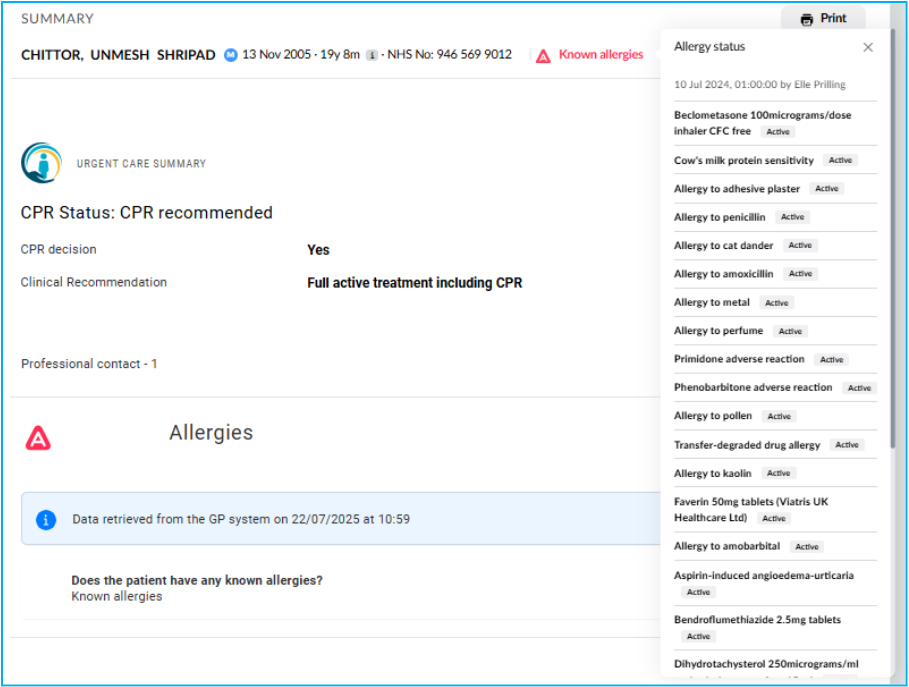
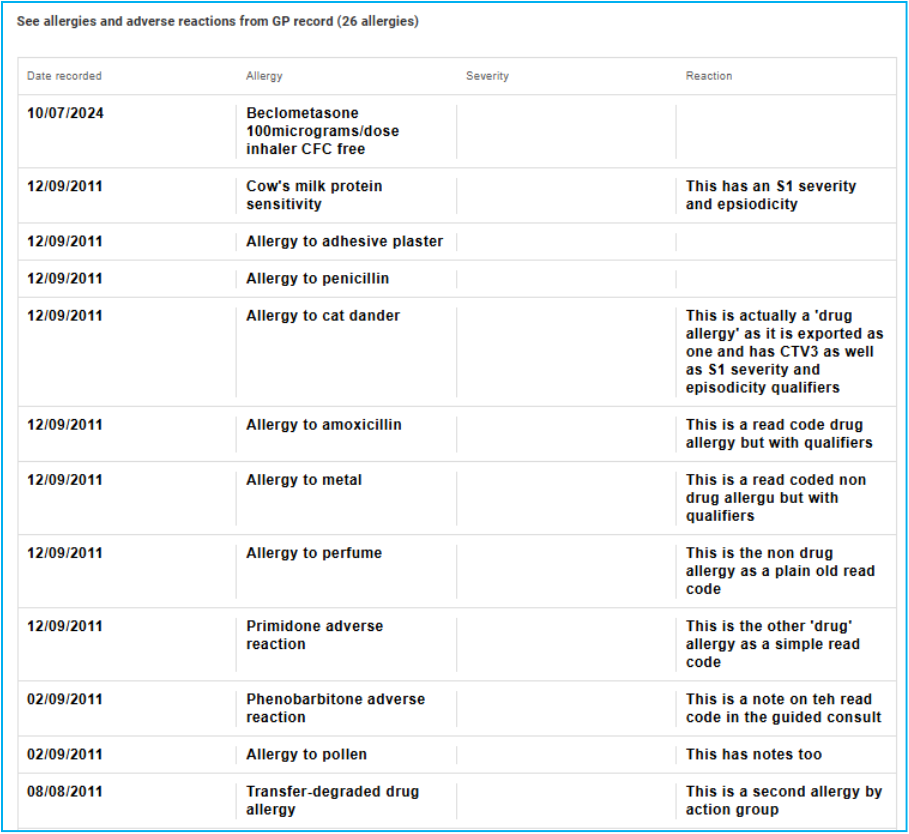
Allergies are displayed in two places. They appear in the patient banner (Fig 1.0 and 1.1) and also are visible in the medications and allergies form (Fig 1.2)
The patient banner shows known active allergies, who entered this information and when. This enables and supports decision making in a crisis.
Fig 1.0

Fig 1.1.
The medications and allergies form display allergies in a table which will include the date it was recorded, the allergy, the severity and reaction.
Fig 1.2
Medications
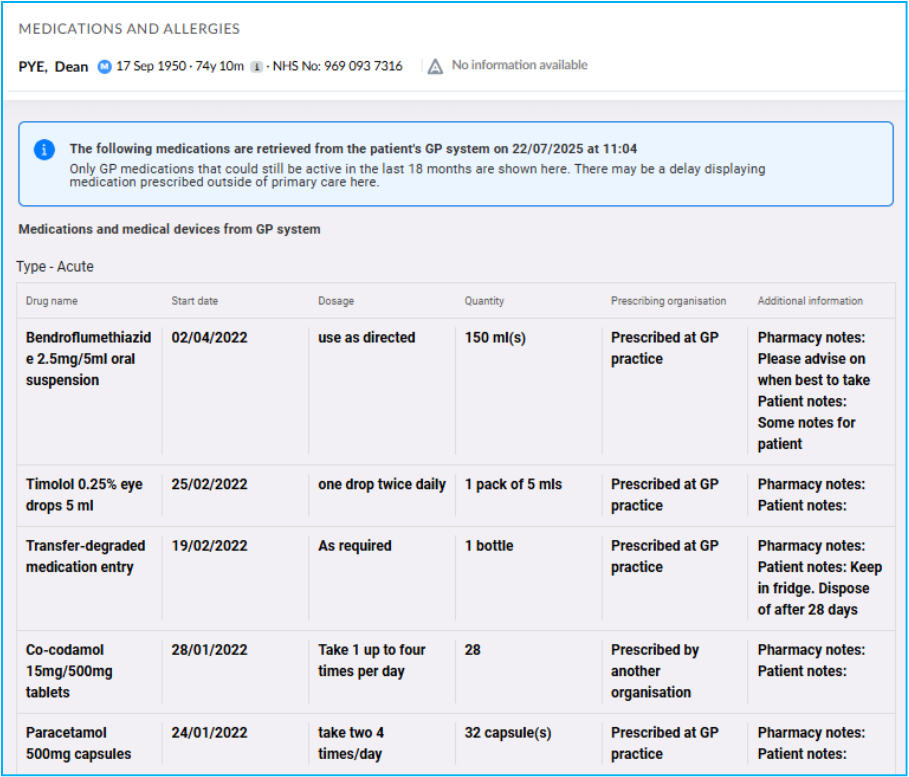
Medications are displayed within the medications and allergies form (Fig 1.3). Acute, dispensing and repeat dispensing medications are viewable in tables. The information available includes; the drug name, the start date, dosage, quantity, prescribing organisation and additional information.
Fig 1.3
What information is resurfaced from the person’s GP record?
As part of the integration, the UCP displays acute, repeat, and repeat dispensing medications, as well as medications that have been stopped within the past 18 months.
Allergy information recorded in the GP record is available, including the allergen, severity, and documented reaction. In addition, certain prescribed medical devices, such as stoma bags and catheters are visible through the integration, further supporting safe and informed care planning.
Do health or care professionals need to do anything?
No, the process will be fully automated. Healthcare professionals do not need to take any additional steps to access this information. When viewing a patient’s care plan in the UCP, medications and allergy data will appear automatically, ensuring seamless access to up-to-date clinical information.
Will patients be able to view medications and allergies information in the UCP via their NHS login?
Patients are not able to view their medications and allergy information via GP Connect within the UCP. This is not due to a desire to withhold information, but rather because this data is already available to patients through the NHS login service, which also uses GP Connect. Patients can continue to access their up-to-date medications and allergy details by logging into their NHS App or other NHS login-enabled services.
What should I do if I get an error message?
There are several reasons why an error message may appear when accessing GP Connect information. If you do encounter an error, please contact our helpdesk so we can support you in resolving the issue promptly.
Multifactor authentication login
We’ve added multi-factor authentication (MFA) for all users who access the UCP through the web portal. Previously, MFA was only required for users accessing the UCP outside the Health and Social Care Network (HSCN) network. Now, it applies to everyone using the web portal.
Why are we doing this?
MFA adds an extra layer of security to protect user accounts. It helps keep the system safe, even if someone’s password is stolen.
What has changed?
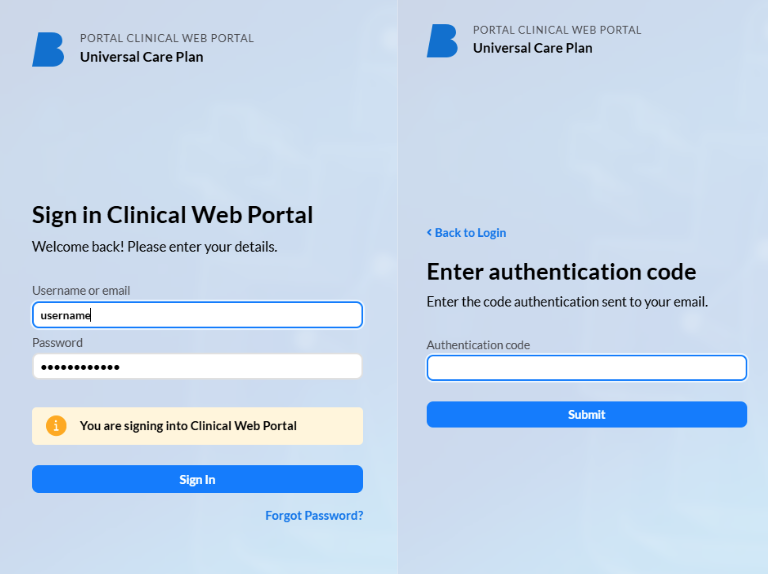
When logging in to the UCP web portal, users will:
-
- Enter their username and password as usual
-
- Then, receive a one-time code by email
-
- Enter that code to finish logging in
Disclaimer: All screenshots shown are for illustrative purposes only and use fictional examples. Any resemblance to real people or actual data is purely coincidental.